What Biometric Verification Means in Recruitment and How to Prepare for It
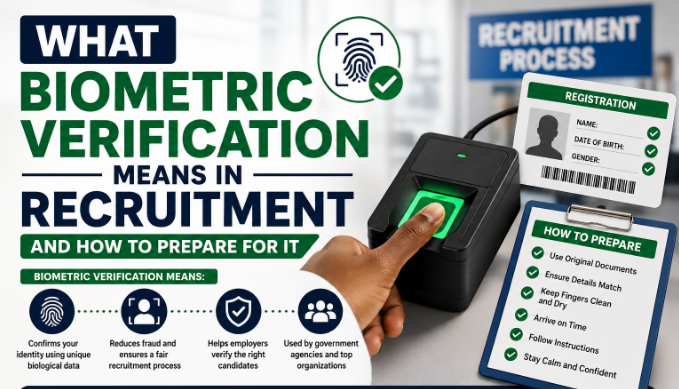
What Biometric Verification Means in Recruitment and How to Prepare for It: Biometric verification has become a standard part of Nigerian government recruitment, specifically introduced to reduce impersonation and identity fraud during screening and testing. Understanding what it actually involves helps you prepare properly and avoid unnecessary anxiety on the day.
What Biometric Verification Actually Checks
In most recruitment contexts, biometric verification involves capturing your fingerprint, and sometimes a facial photograph, at the point of screening or testing, which is then matched against the biometric data captured when you originally registered or applied. This confirms that the person sitting the test or attending screening is genuinely the same person who submitted the original application.
Step-by-Step: What to Expect During Biometric Capture
- You’ll typically be directed to a dedicated verification desk, separate from the document verification table, staffed with a biometric scanning device connected to the recruitment system.
- You’ll be asked to place specific fingers on a fingerprint scanner, usually following on-screen or verbal instructions from the operator about which finger to use and how to position it correctly.
- If facial capture is also part of the process, you’ll be asked to look directly at a camera, often required to remove glasses, hats, or anything else covering your face, similar to a passport photograph requirement.
- The system compares your newly captured biometric data against your original registration record, and in most cases gives an immediate confirmation or flag on screen.
What Happens If There’s a Mismatch
A genuine mismatch can occasionally occur due to technical scanning issues rather than any fault of the applicant, for example, a poor-quality original fingerprint capture during initial registration, or a temporary skin condition affecting fingerprint clarity. If this happens, calmly explain the situation to the verification officer and request a re-scan, since this is a known, manageable issue rather than an automatic disqualification.
How to Prepare Practically
- Avoid activities right before screening that could temporarily affect your fingerprints, such as extensive manual labor, since calloused, cut, or excessively dry fingers can occasionally cause scanning difficulty.
- Ensure you’re using the same basic appearance as your original application photograph where facial verification is involved, drastically different hairstyles or significant weight changes occasionally raise unnecessary questions, though this is rarely a serious problem if your other documents clearly confirm your identity.
- Stay calm if the first scan attempt doesn’t register cleanly, this is a common, fixable technical hiccup, not a sign of any problem with your application.
Why This Step Exists
Biometric verification was introduced specifically because impersonation, where someone else sits a test or attends screening on behalf of the actual applicant, was a documented problem in earlier, less secure recruitment processes. Understanding that this step protects the integrity of the process for genuine applicants, rather than viewing it as an obstacle, makes it easier to approach calmly.